MP3 AUDIO → MP4 VIDEO
MP3 to MP4 with a cover.
Choose an MP3 and make an MP4 with its sound and a still cover image, right in this browser.
One MP3 audio file. No upload or account.
PNG or JPEG. Without one, the video uses a plain CueConvert cover. The image is fitted into a 1280 × 720 frame without cropping.
Choose an MP3 to begin.
Your MP3 and cover image stay on your device. Only the video-processing runtime downloads; no file bytes are uploaded.
MP4 ready
Download MP4Play the download before sharing it to check the whole audio track and cover.
A file you can check yourself
Download our 34-second English narration MP3, then try it above with the built-in cover. This is an original CueConvert voice sample, not a promise about other files. The downloaded video should have one still picture and an audible track through the end.
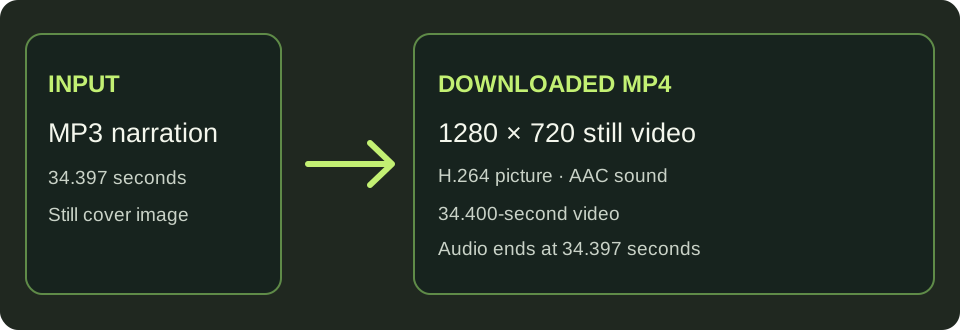
Measured on this Windows test machine · 2026-11-01
| Input | Runtime already loaded | Downloaded MP4 | Streams checked |
|---|---|---|---|
| 34.397 s English narration · 246,563-byte MP3 · built-in cover | 13.2 s processing in browser | 418,198 bytes · 34.400 s | 1280×720 H.264 still video · AAC audio ending at 34.397 s |
First use downloads the FFmpeg runtime, which adds time. These figures come from one browser run and the downloaded file inspected with ffprobe; other devices, files and codecs may differ. The 0.003-second container/audio-end difference comes from rounding video duration to a frame boundary at 10 fps; the audio stream continues to 34.397 seconds.
What the MP4 contains
The output is a video frame with a still image and an AAC audio track. The MP3 audio is encoded into the MP4 container; it is not simply renamed. The picture stays still while the audio plays. You can provide a cover image or use the built-in dark cover.
This page creates a video file you can upload yourself; it does not upload to YouTube or add subtitles. For a video with an existing SRT or VTT track, use add subtitles to video. To create timed subtitles from speech, use auto captions.
What to check before sharing
Is the MP3 audio copied without a quality change?
No. In the measured MP3 test above, this tool encoded the audio as AAC for the downloaded MP4; it did not preserve the original MP3 bitstream. If your source is already AAC in an M4A file, use the M4A to MP4 tool: its tested AAC bitstream matched the input after download.
Listen to the beginning and end of the downloaded MP4 and check that the image looks right. Processing time and the largest file your browser can handle depend on your device's memory. This tool does not claim an unlimited duration or file size.
Need the opposite result?
If your source is already a video and you need it without sound, remove the audio track from an MP4. The video picture is copied without re-encoding.
If your recording is a PCM WAV, turn that WAV into an MP4 with a still cover. The WAV audio is encoded as AAC in the tested output.