SUBVIEWER FILE → SUBRIP FILE
SBV to SRT.
Choose one .sbv caption file, convert it locally, check the cue count and download .srt.
Your caption file stays in your browser. Nothing is uploaded.
Choose SBV input
Choose one UTF-8 .sbv file to start.
Source cues: —
SBV preview
Your SBV preview will appear here.
Review SRT output
Your SRT preview will appear here.Download SRT ↓
Compare words and timing with your own video before using the result.
What changes in the tested format?
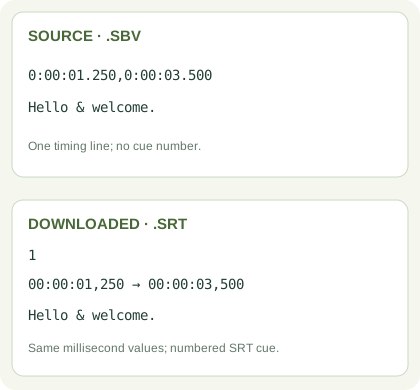
A basic SBV cue starts with one line containing two period-millisecond timestamps separated by a comma, then caption text. SRT adds sequential cue numbers and uses HH:MM:SS,mmm → HH:MM:SS,mmm timing. This tool retains your cue text and millisecond values, and rejects a file if any block has invalid timing or missing text; it will not silently export a partial file. It accepts one UTF-8 .sbv file at a time, not a YouTube URL or video.
YouTube's supported caption file documentation lists both basic SubViewer (.sbv) and SubRip (.srt) formats and examples. This page implements the timestamped SBV layout shown there, without promising styling or position conversion.
Quick questions
Does this download captions from a YouTube link?
No. Bring an .sbv file you already have; no request is made to YouTube and no file is uploaded to CueConvert.
Will a two-line SBV caption stay two lines?
Yes for the plain-text lines in the tested SBV layout. Check the output preview before saving.
What if one block is malformed?
The conversion stops and reports the block number. Correct the source before downloading so no cue is silently lost.
Other relevant tools: SRT/VTT/TXT converter, pasted timed transcript translator, and local captions from audio/video.